I am having issues wrapping my head around all of this. How do I use this template with cymbals. I only see the drums and cymbals grouped together. How do I seperate them so the cymbals are on their own? I tried to make my own midi generators but they didn’t have all of the options like the ones that are made in the template. I saw a video a few days ago showing how to create midi generators but I don’t remember where I saw it. I’m struggling with piecing all these resources together to get this all working. It doesn’t help that I also just moved and have been setting up a new studio in my house so I’m integrating old stuff and new stuff into a new-ish system in a totally new set up. Thanks in advance for any help.
I figured out my midi generator problem. I was selecting midi router on accident. My bad.
I’m not quite sure what you mean. Are you unable to use the cymbal sensors at all? And when you say “separate them,” what exactly are you referring to? What are you ultimately trying to accomplish?
For what it’s worth, I find the software pretty confusing too—and I work as a software analyst. That said, the complexity is also what makes it powerful and highly configurable. I definitely don’t know how to do everything in it yet, but I’m hoping that with time—experimenting, watching and re-watching the help videos, and reading through posts on this forum—it will start to make more sense.
I think it probably will for you too. It just takes some patience while learning the system.
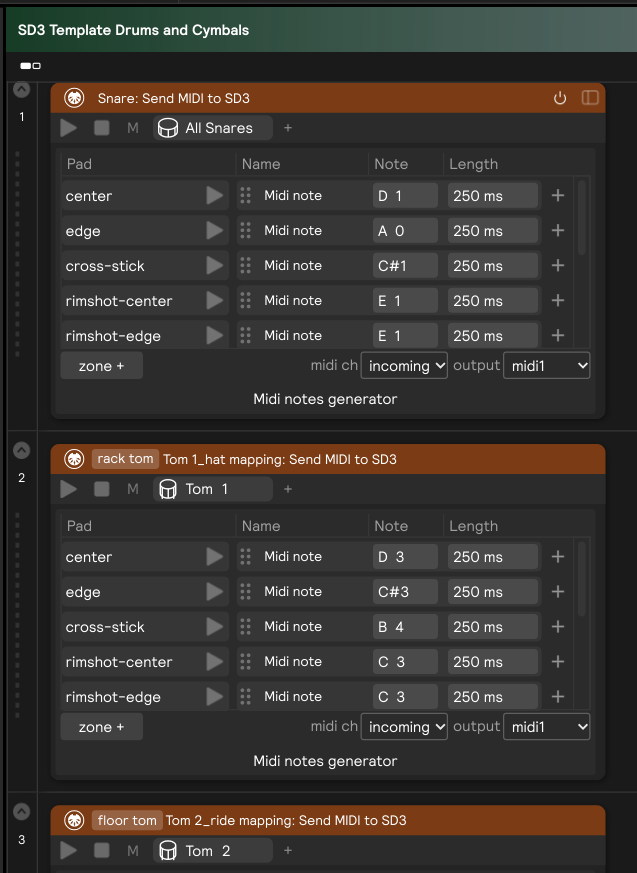
This is what I mean.
Drums and Cymbals
Cymbals Only
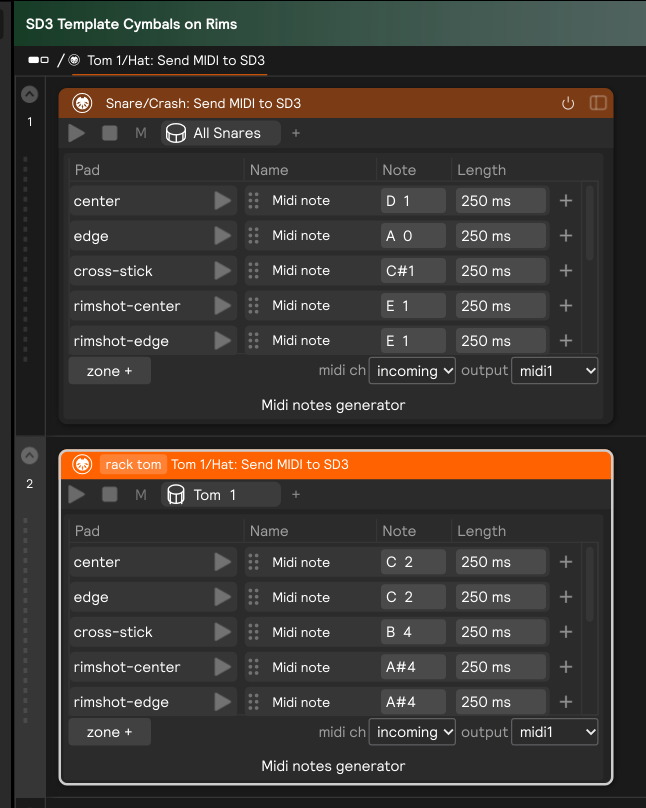
I don’t see where the cymbals are on their own. Like a MINI generator just for the ride, crash, etc.
Thanks for the encouragement. I built multiple iterations or a to e kits and have used edummin with SD3 for the last 6 years. I think I normally have a pretty good grip on this sort of thing but this has me all kinds of confused and just not confident in what I am doing. I love playing the things though and I know once it all clicks it is going to be unreal.
I think you might be using an older version of the template. Try downloading it again from the top of this thread
When you get the newer template, you can create a cymbals only version by deleting all the other kit pieces
Thank you! That was it. I had the old template. And that right there is a good example of my struggle. There are resources scattered all over. I understand I bought into a product that is essentially in a soft release and all, so there are certain issues im expecting to work through. I also expect that the software and product will likely improve fastly in the future. I’m really excited for this system!
I’d suggest you play with the interface more and become familiarized with it before trying to use it with SD3 or any other VST. See what each module does and follow the threads and submenus. I spent a couple of weeks playing only with it before I used it with SD3, now I feel confident using it.
Thanks. Im gonna take that suggestion.
I want to use this template in ableton and superior drummer 3 in another track but I’m not getting any midi sent to Sd3 from SP2, I have the iac driver in my mac activated but nothing, I’m using Live 12 intro, I’m getting sound when playing my non SP2 drums but when I play theSP2 cymbals nothing
@stevenz is the template still a work in progress? Just wondering if you might have any improvements or updates planned?
…or any updates improvements planned for midi output at all, even if it’s not sd3 specific?
Also I had asked a question a while back on whether it might be possible to use a separate controller to control the close/open cc values for the hi hats, but never got a response. I’m thinking of something pedal mounted like an optical sensor or a Hall effect sensor. Wondering if that might result in improved close/open articulation in sd3.
Thanks!
Hi @scoTTTimo,
I’ll update here if/when changes are made to this template. There will definitely be improvements in future iterations of the software on MIDI output, for sure, and things that will help with SD3 workflows. That may include updates to this template, or it may include a different workflow. I’ll be sure to put a big, bold EDIT Marker across the top of this post and additionally add a comment whenever that happens.
For your question on hi-hat sensors, I’d first recommend checking out the Beta app that was updated today (write to support@sunhou.se if you are not already in the Beta program and we’ll add you).
There was an update that improves pedal control for noisy environments. It was a night and day change for me at my home station, where I have some kind of ground loop/hum that was causing issues with my open/closed detection. Check it out and see if it improves things for you like it did for me.
But to answer your question directly, the template is already sending a CC1 message to SD3 (which SD3 automatically maps to Hi-Hat open/closed articulation). I imagine that’s probably the route you would also go by adding an additional sensor somewhere on the hi-hat, and I don’t think there would be a benefit in doing that.
2 Likes
@stevenz thanks for that detailed response. I was in the middle of installing the new beta when I wrote my questions. The hi hats do seem better!
Another thing I’ve been meaning to ask about is I’m getting some false triggering in sd3 sometimes when I crash on the ride cymbal. Sometimes it’s an extra crash so it’s like two crash articulations in quick succession. Other times I get the initial edge crash followed quickly by either a bow note or a bell note. I am using the 20” Evans db one low volume cymbal, and the cymbal sensor is tightened as much as possible. Any ideas?
Thanks!
Hi @scoTTTimo,
No problem! Glad to hear you’re getting a better response from the hi-hats on the new Beta 
Is the false triggering only happening in SD3 and not in Sensory? You would be able to tell by watching the UIs of the Hardware Input for the cymbal. If you’re hearing a false trigger in SD3 but only seeing one impulse on the Velocity I/O or Threshold Window of the Hardware Input in Sensory Percussion, then the issue is something happening in SD3.
More likely, there is probably a double hit getting detected in Sensory’s Hardware input. The most likely cause of this would be something with the setup. With the cymbal, you don’t need to tighten the sensor as much as the hi-hat. It should be nice and snug, still, so that the rubber “flex felt cradle” doesn’t lose contact with the cymbal on high velocity hits (which could be a cause of double hits: the cymbal bouncing on the felt), but it doesn’t need to be as tight as the hi-hat sensor.
Another likely cause for double hits would be the “felt cradle” and the sensor itself being misaligned: make sure the line on the sensor lines up perfectly with line on the felt, and the grooves of the felt and sensor are together.
Also, make sure the cable connection is solid. If the cable is getting jostled when the cymbal is crashed hard it’s possible that might cause an extra hit to be detected.
After checking these things, if you’re still getting double hits, then feel free to send a diagnostic report to support@sunhou.se, make sure to crash the cymbal in the way that causes double hits during the sensor recording portion of the diagnostic report.
1 Like
Loosening the sensor helped a lot. I got it to do it one time, but that seems to have pretty much solved it.
Thanks!