I found a feature request from a few years ago but did not see a solution, and I have not managed to achieve this myself. Is there now a direct way (or any workaround) to trigger pads (snare, kick, toms, or cymbals) using MIDI notes?
In other words, is it possible to assign for example one MIDI note to the snare center and another to the snare rim, and trigger these specific locations through MIDI?
This feature would allow all existing library sessions and sound packs to be used by non‑pad controllers without requiring extensive manual setup.
Yes! Using the pads type input you can train traditional triggers, pads, etc by assigning midi notes to a grid pad similar to an Ableton drum rack. You lose some of the sensory percussion features like multiple zones or timbre control but speed and velocity controllers etc all still work. I use it to receive midi from my wireless Roland pads but it works with anything that sends a MIDI note. Easiest way is inside the plugin with a DAW but you can also use an IAC bus just make sure it’s properly set up
Thank you very much for your response. More or less, this is the way I do it so far. Let me explain in detail:
I am using Roland triggers/traditional pads which go straight to the Roland TM-6 pro. Then I connect the MIDI out of TM-6 to a (windows) laptop with a USB-MIDI Interface cable. I do not use or have Ableton.
While inserting a grid pad in SP2 software and training the notes works very well, I would like to find a way to assign MIDI notes to a Snare, Kick or Tom pad or alternatively train a specific zone of the snare / kick / tom pad to a midi note. Unfortunately, during the train process of the pad, the USB-MIDI is not an option (in MIDI settings the USB-MIDI interface is properly recognized).
In an older feature request post, I read that in the future it would be possible to drag the grid pad or midi into the snare/kick/tom pad of interest. However at the moment this does not work.
Any suggestions or thoughts on how to achieve this?
I may be misunderstanding the question, but if you want to use SP2 zones to output a specific midi note, you only need to drag a midi note generator module into the “edit” section of the set you are working on. Then you can select which drum sensor this midi generator is assigned to; each zone will have a drop down menu to select the associated midi note.
Thank you for the answer. While the process of outputting a midi note is quite interesting, it is actually the opposite of what I am trying to achieve.
In my case, midi notes are the input to SP2, and I would like to use them to trigger different pad zones (e.g., be able to assign C2 midi note to snare pad center, so when a C2 midi note is played, the snare pad center zone is activated).
Hi @Antonios - what are you using to send MIDI into SP? have you checked out the Pad Input type? That input type is designed for MIDI devices like edrums, SPDs, or whatever. You can pair it with the Grid Pads controller module.
If you’re mostly using drum sensors and just want a one-off MIDI note that is triggering a snare pads controller. Then you can use the MIDI Input device type and make an assignment on the play button of the module you want to trigger.
I am using Roland TM-6 pro which is sending MIDI to SP via a USB-MIDI interface cable. In SP software I have indeed created a Pad Input which I have trained to respond to the MIDI notes which are sent from TM-6. The Pad Input is receiving midi signal from the TM-6 without any issues. All good so far.
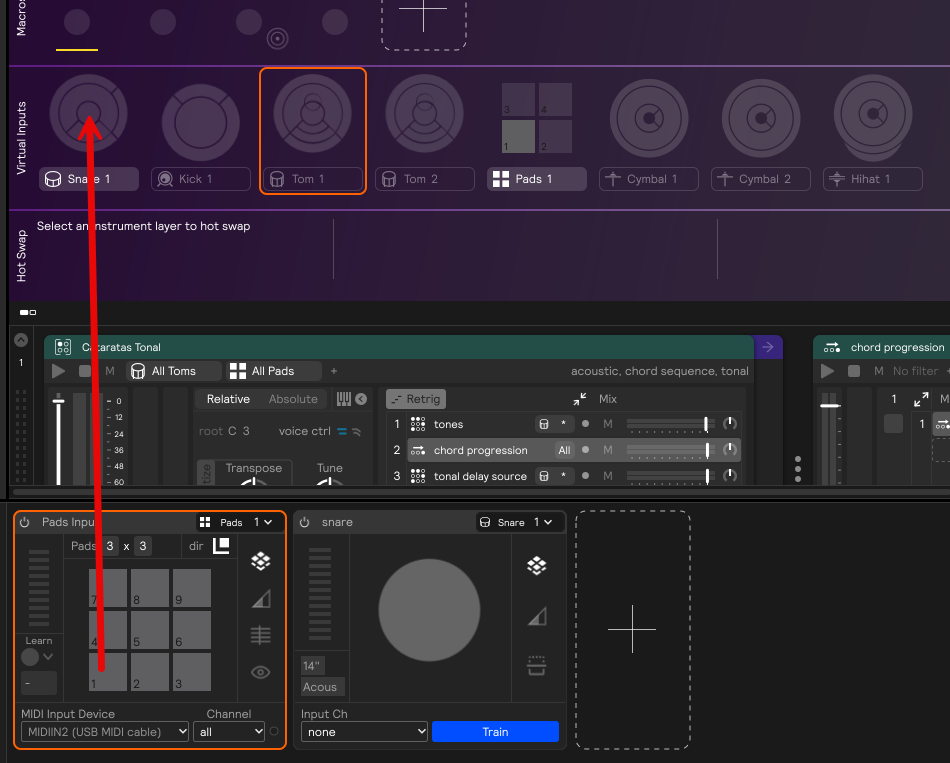
I would like now to find a way to control the Snare Virtual Input with the Pad input. For example, control the Center of Virtual Pad Snare 1 with Pad 1 of Pad Input as shown in the photo below. I understand the limitations, but still this will allow me to use existing templates with midi and without a lot of fuzz.
Hey @Antonios , did you ever find a solution for this? I’m surprised more people aren’t asking for it. This would greatly improve quality of life for pad users.