Building New Cymbals-Only Set

I want to build a Sensory Percussion cymbals-only set/session. My plan is to use Sensory Percussion for cymbals while triggering DW SoundWorks VST for drums using DWe drums and a Roland V71 interface/module.

I have searched (unsuccessfully) for a step-by-step video that would show how to create and save this.

I thought it would be as simple as plugging in the sensors and telling the software what type of sensor they were (HH, Ride, 16” Crash, 18” Crash) and then be able to drop/assign cymbals to them.

Can someone please point me in the right direction?

Thanks!*

1 Like

Haven’t done this but thinking of having an additional cymbals only setup for some acoustic drums on stage.

I have to say that the level of support in this “support” forum seems to be sub par - and that’s disappointing.

I am trying to use SP as a solution to the problem many eDrummers have when playing heavy rubber eCymbals. My intend is to prove the concept of using the 7 available sensor inputs on the portal to deliver a much more realistic sounding and improved playing experience as a stand-alone cymbal set up.

Hi @BillyG ,

First, just want to reiterate (as noted when you create a topic in this category) that the Support category is meant for user-to-user support. If you have a question that needs the attention of the Sunhouse team, we generally advise to email support@sunhou.se and we will be able to better see and answer your question.

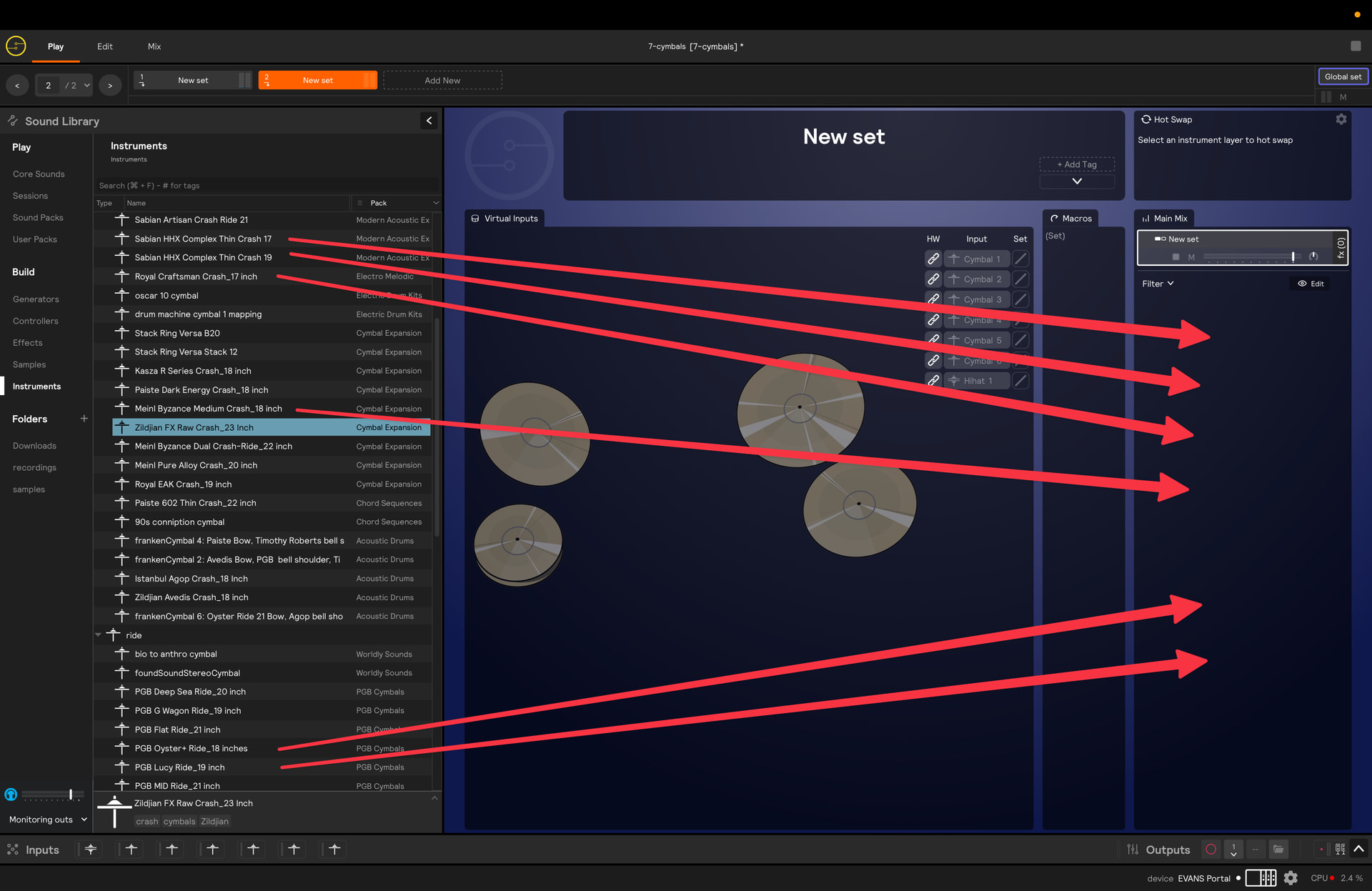
As for your question, you might want to check out our getting started tutorial video, which goes over how drag/drop cymbals from the Instruments section in the library into your current set around the 12:48 mark. The video shows 1 hi-hat, 1 ride, and 1 crash, but if you want more, you would simply repeat that process 4 more times (screenshot below):

You’ll just want to make sure that you have the same number of cymbal/hi-hat hardware inputs to match up to these instruments that you drag in. Something like this:

Here’s an .spi file that contains these inputs, which you can load by going to File > Load Inputs and selecting the file:

7-cymbal-inputs.spi (1000 Bytes)

I will also attached a session file that has 1 hi-hat, 2 rides, and 4 crashes, all taken from our new Modern Acoustic Expansion sound pack, so make sure you have that pack downloaded before opening. It follows this schema:

hi-hat = Sabian HHX Legacy Hi-Hats 14” (hi-hat 1)

ride 1 = Sabian HHX Complex Medium Ride 21” (cymbal 1)

ride 2 = Sabian Artisan Elite Ride 20” (cymbal 2)

crash 1 = Sabian HHX Complex Thin Crash 17” (cymbal 3)

crash 2 = Sabian HHX Complex Thin Crash 18” (cymbal 4)

crash 3 = Sabian HHX Complex Thin Crash 19” (cymbal 5)

crash 4 = Sabian HHX Complex Thin Crash 20” (cymbal 6)

Here’s that session:

7-cymbals.sp2 (740.3 KB)

And a quick video demoing all 7 inputs:

Hopefully that gets you started and you can tweak as you please from there!
1 Like

This is super helpful. Thank you!

Can you please explain how (in the pic above) did you get all those cymbal instruments?

I downloaded the cymbal expansion pacs but they all loaded as “samples”

Any help would be greatly appreciated.

Hey Jeff - I had the same issue at first. I think the Modern Acoustics sample pack originally loaded into just the samples folder. That has been corrected. I redownloaded the pack and reinstalled it and they are now available as instruments.

Thanks for the help BillyG. I’ll try it out later today. By the way, do you have any latency issues? I have to set it one step higher than medium in order to get good clean responses but then I have a slight noticeable delay. Have a great day.
