I bought the v2 bundle with Evans portal, but i have one v1 sensor from before that I included in the set.
When i load in the Ableton template that you provided and set everything up, I get my v2 sensors to work properly, but I can’t seem to find a way to recieve any input from the v1 sensor. In the standalone application it works fine. How can i make it work?
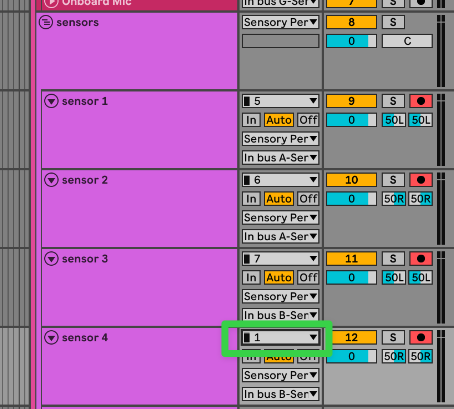
I think you just need to change the routing of the template’s sensor input channels to be either Input 1 or Input 2 (depending on which combo jack you have plugged your V1 sensor into).
The V2 sensor inputs are channels 5-11. The Combo Jack inputs are channels 1 and 2.
So if your V2 sensors are plugged into the first 3 sensor inputs of the Portal, and your V1 sensor is plugged into Mic/Line A, then your sensor input routing should look like this: