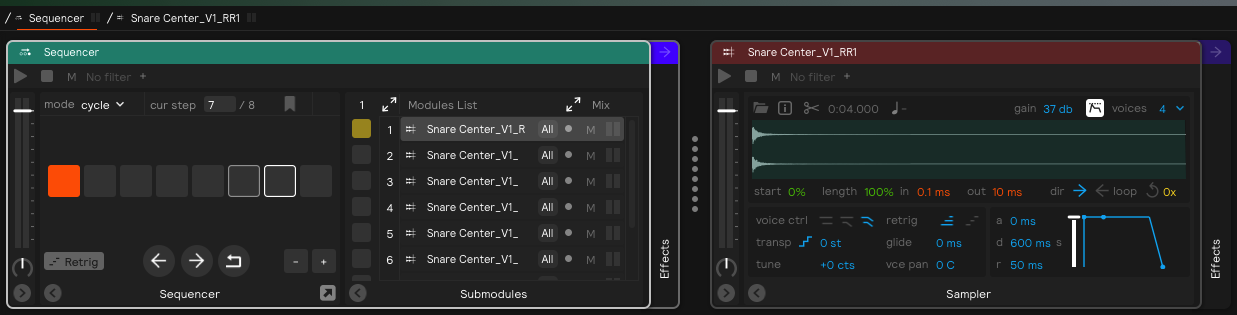
Hi all, I recently bought a sensory percussion pack and I want to achieve what’s in the hit controller section of the online manual entitled “but wait, there is more!”
“Of course within the Hit Controller you can infinitely nest any other controller (including other hit controllers), allowing you to create some really intricate and cool sound design.
So – for example – you could have a timbre “center-to-edge” hit controller mapped to the head zones of a Drum Pads controller (Center and Edge), and then have three velocity hit controllers mapped to that range named “Center,” “Off Center,” and “Edge.” In this way, if your training is good, then you can essentially enable a zone called “Off Center” (or whatever you want to call it) between the Center and Edge zones.”
Can someone explain step by step how to achieve this, I’m trying to do it but I don’t know where to start…
I’ll start with the easier case of just assigning three samples into a Center-to-Edge Timbre Hit Controller.
Create a snare or tom Drum Pads controller and disable all zones except for center and rim.
Drag and drop or create a Hit Controller inside the Drum Pads controller and set it to “timbre” mode. By default it will then set itself to Center to Edge, which is what we want.
Make sure that the Hit Controller is assigned to the center zone. If you created the Hit Controller by dragging and dropping it from the Library onto the center zone of the Drum Pads controller, then that works. But if you created it by clicking the “add module” prompt inside the drum controller, then you will need to map it to the center zone in the pad map matrix.
Drag and drop three samples into the Hit Controller.
In the video below, I assigned three tonal samples to the timbre hit controller to demonstrate how it works. Remember, your training has to be very well dialed in for this to work!
For the “multi-sampled” acoustic method that is described in the online manual, I recommend checking out the Aluminum Snare Drum that is in “Mixed Drum Kit” and “Combo Drum Kit” sets in the Acoustic Drums Core Library Pack. I also included it in the attached .sp2 below. It is essentially the same basic idea as above, but instead of single samples, each step of the timbre hit controller is, itself, a velocity hit controller, each containing sequencers of round robin samples.
Samplers are normalized by default in Sensory Percussion 2, which is very likely the behavior you want for multi-sampled acoustic replication. The autogain/normalization feature makes it so that the sample playback is scaled by your playing, and not by the recorded volume of the sample itself.
understood thanks, as for the sample adding order, do I add them fro quietest to loudest or it doesn’t matter? in your example you added them starting with V3 which I assume is the loudest and then you inverted them in the matrix.
I got the multisampled snare working now, but I still get the edge samples louder than anything else, I wish the samples weren’t normalized by sensory and just imported as is and played with the volume they were recorded. The samples are really loud at 46 db!
@edxter: From reading your comment it sounds like you may be forgetting an important step.
The lowest velocity samples should be in a sequencer inside a hit controller (set to velocity mode). So they should never be played back at full volume: they should only be triggered by your quietest playing. Only the highest velocity samples should be triggered at full scale.
Feel free to post or DM me your .sp2 and I can check it out and rearrange if necessary. No need to send me the sample files as long as they are labelled with velocity levels
Here is the result of my imported multitimbral snare samples, just need to smooth those rolls and blend the zones transitions, right now they are a bit rough. It’s the Leedy snare from Superior Drummer 3.