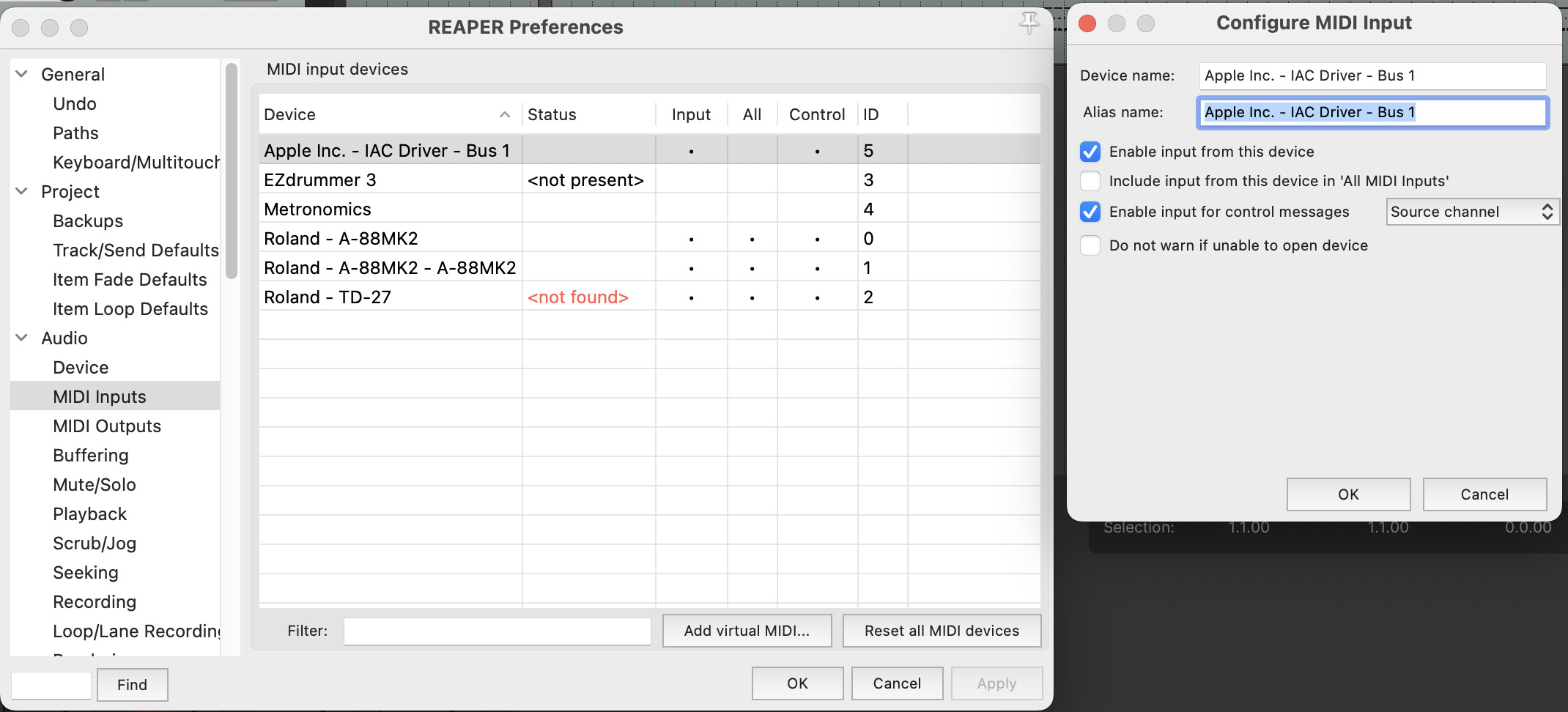
I’m new to this midi routing stuff, unfamiliar with these terms/concepts and what they mean. I think I need a “For Dummies” tutorial on this - exactly what buttons to press in which windows in which software to get this working. SP 2.6 seems to have brought a lot of newbies coming from the plug-and-play e-kits, and we’re all confused.
Anyhow, I’m currently stuck at the Virtual Midi Bus thing. I’ve enabled the IAC Driver on my Mac, but it doesn’t show up as an option in the “Output Device” dropdown menu within my midi output. The only option is “None.” What am I missing?
Am I correct to enable input and control messages? And does the “ID” being “5” mean that the IAC Driver is mapped to midi channel 5? Sorry - total dunce here.
I’m also testing to see if this template works with EZ Drummer 3, since that’s what I already have. I understand it may not work but I thought it’d be worth a try. Big thanks
I’m not a Reaper user, but I assume that they mean Continuous Control (CC) so if that’s the case, yes, you’ll want to allow control messages. I don’t know what ID5 means.
I think the template should be compatible with EZdrummer3, at least mostly.
Can you please tell me how to get all my inputs over into the main mix module as shown in the first pic of your SD3 “Important Steps” post. I can only send over one input and then when I pick another to send over it replaces the previous one. I’m trying to get all six inputs sent over to be able to save the group as a preset. Your help is greatly appreciated.
I think I follow. I think you just need to select the Superior Drummer 3 group layer, and not the Main Mix Layer. See video below.
And the save-as preset is really just a “nice-to-have” and it’s useful if you plan on doing more customization and integration between SP2 and SD3 and/or additional MIDI destinations. For example, if you’re simply routing MIDI from SP2 to SD3 and you don’t want to layer sounds simultaneously from Sensory and SD3, then you can probably get away with just loading the template session in most cases.
If you’re having difficulty getting it set up feel free to email to support@sunhou.se
I used to try playing barks with the hihat and it didn’t work. Because when I open the hihat and I hit it with the stick, the MIDI message sent to SD3 is « closed » hihat. I have to maintain the hihat open and hit it a second time to get the midi message as « open ».
So my question is : did you try to play barks with this template ? And if yes, si it work well ?
I don’t have the SP2 system but have been very interested in it and trying to learn about it. I listened to all of the samples here on the site of the acoustic drum packs. - you have drum & bass kind of stuff sort of on lock. But much much more than that is needed. I’m not really hearing anything that could be in rock bands or any live open drum sounds with resonant heads close micced, in different types of rooms with bleed control, overhead mic control and, most importantly, at least 2 room mics. Superior Drummer 3 will continue to be absolutely essential with this system until this is addressed. Which would be fine, But is there a deficiency with the quality of triggering compared to the internal SP2? Do we not get all the detailed SP2 sensors because the rich data from these sensors get lost in MIDI translation? And what about when you want to record - specifically record midi so that you can edit with midi instead of wav files? I’d love some guidance on this. I currently have the Roland digital snare and hi hats with TD27 and I thought this system would be much more responsive with the hi hat and cymbals especially. But is that even true and/or does that all go out the window when you send midi to a separate VST like SD3? One big thing I’m hoping for a real feeling and sounding hi hat better than the Roland digital hats. I can’t seem to determine if that’s what would happen. I’d love some guidance. Thanks!