Hello all! So I’m new to this crazy world of SP and I’m working my way through the tutorials on Youtube. I’m not getting the same response as the sequencer tutorial shows when trying to sync sequences. Firstly, how do you “generate from selection” (timestamp 10:33 in video) or in the updated version of SP2 is that now the same as “Group into”? And secondly once I do this I cannot get the rimshot to move the plucks despite it all being set correctly - or so it seems. It works fine until I group them into a pad and then it won’t step through when I hit the rim-shoulder. I’ve made sure each zone is selected as the tutorial shows but no joy. Anybody out there had a similar thing who could shed some light? Much appreciated if so.
1 Like
Hi @bid!
Yes, you’re right, “Generate from selection” has been renamed to “Group into…”, but I think it still should work exactly the same way it does at around 10:30 of @Patrick’s Sensory Percussion 2 Drum School video on sequencers.
It’s possible that something got unmapped somehow in the set you are working on, but without seeing it, it would be hard to diagnose. If you want, feel free to DM me the .sp2 you are working on and I can take a look.
1 Like
Hi Stevenz, I sent an email with the .sp2 file attached to your email yesterday (the address I got a mail from). Did you get it? Or would you prefer me to drop it here?
1 Like
Hi @bid,
I’m not seeing it in my inbox. I’ll DM you now so you can drop it there, or you can also feel free to post it here, as well, if you prefer
1 Like
I’ve replied to the email with the .sp2 attached, I can’t seem to attach it here as I’m a new user, it won’t let me.
1 Like
Hi @bid,
I just sent you an email to the address you have associated with your forum account. I’m not seeing the emails you sent previously (not exactly sure why).
I’m also not sure why .sp2 files would be restricted uploads by the forum here, so I’m looking into that now.
Let me know if you don’t see the email I sent to you and if not, we’ll figure out another way for you to send the file
1 Like
The Sequencer.sp2 (58.8 KB)
Ah ha! Here you og, this seems to have worked now. I did also attach it in a reply to the email you sent (just incase). Hope you can sort out what’s happening with the project now. Cheers, Bid
1 Like
Hi @bid, I replied via email, too, but just in case someone comes across the post in the future I am also pasting my reply here:
It looks like there are unassigned zones in your drum map. With perfect training/perfect playing, this shouldn’t be an issue – so it would probably be helpful for you to retrain the drum so that rim tip isn’t misfiring when you play rim shoulder – but the most likely you also want to un-assign both the rim tip and edge zones to make this example work best for you. When you un-assign a zone, on the backend the software just forwards the hit message to the most logical zone. So edge hits will be remapped to center, and rim tip hits will be remapped to rim shoulder.
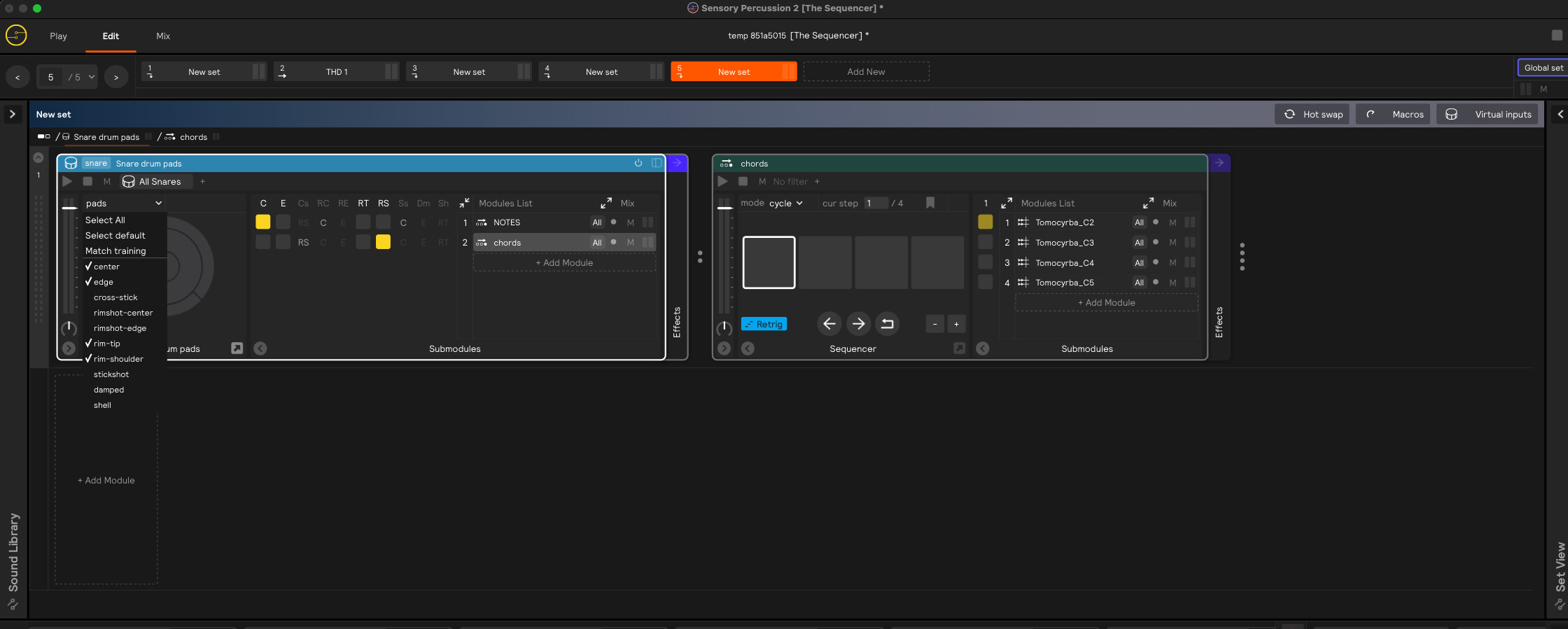
The Sequencer_no-blank-zones.sp2 (58.8 KB)
1 Like
I’ve loaded up the file you sent over and I can see that there are now only 2 zones on my pad however it’s still not stepping through. When I play the rim it doesn’t change the note as it should. Could this be because my pad inputs aren’t set to the 2 zones?
Hi @bid,
I see! Sorry I missed one thing.
I see the assignment you have is set to “Default/rim tip”. That won’t work because the sequencer you have it assigned to is mapped to the Center and so Rim Tip is filtered out. So there’s a few ways you can get around that. One way would be to select “Parent” for the source.
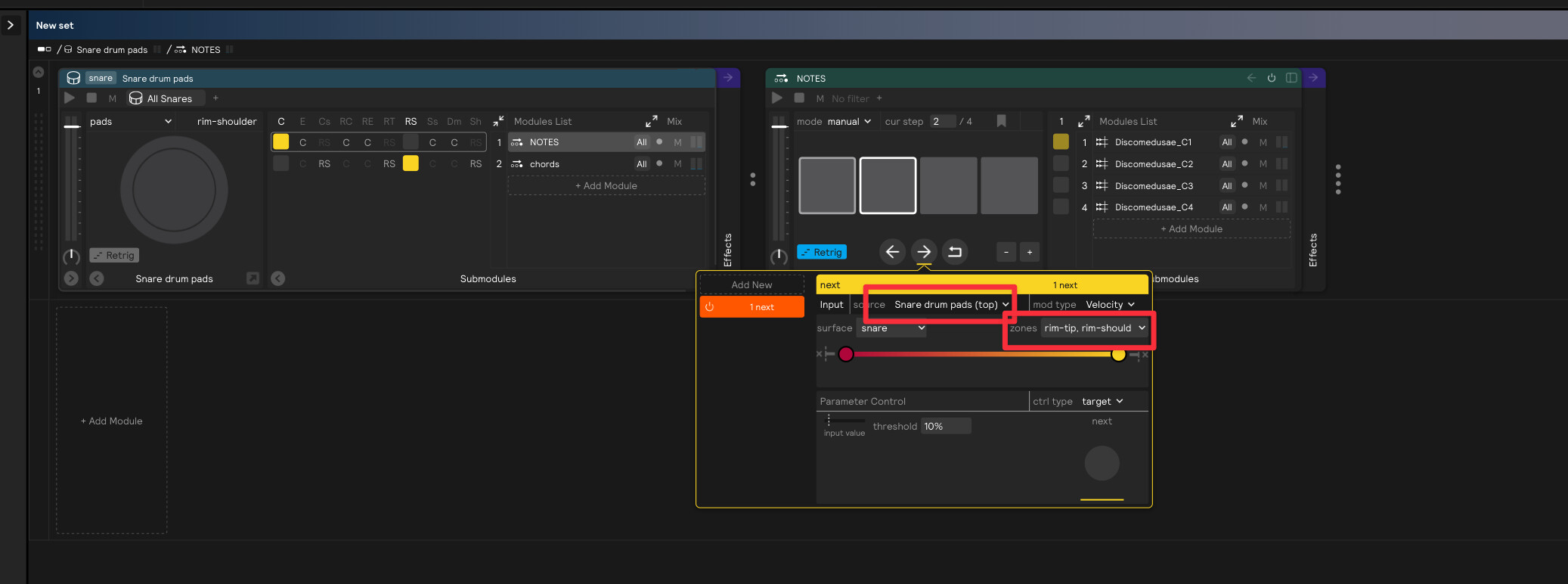
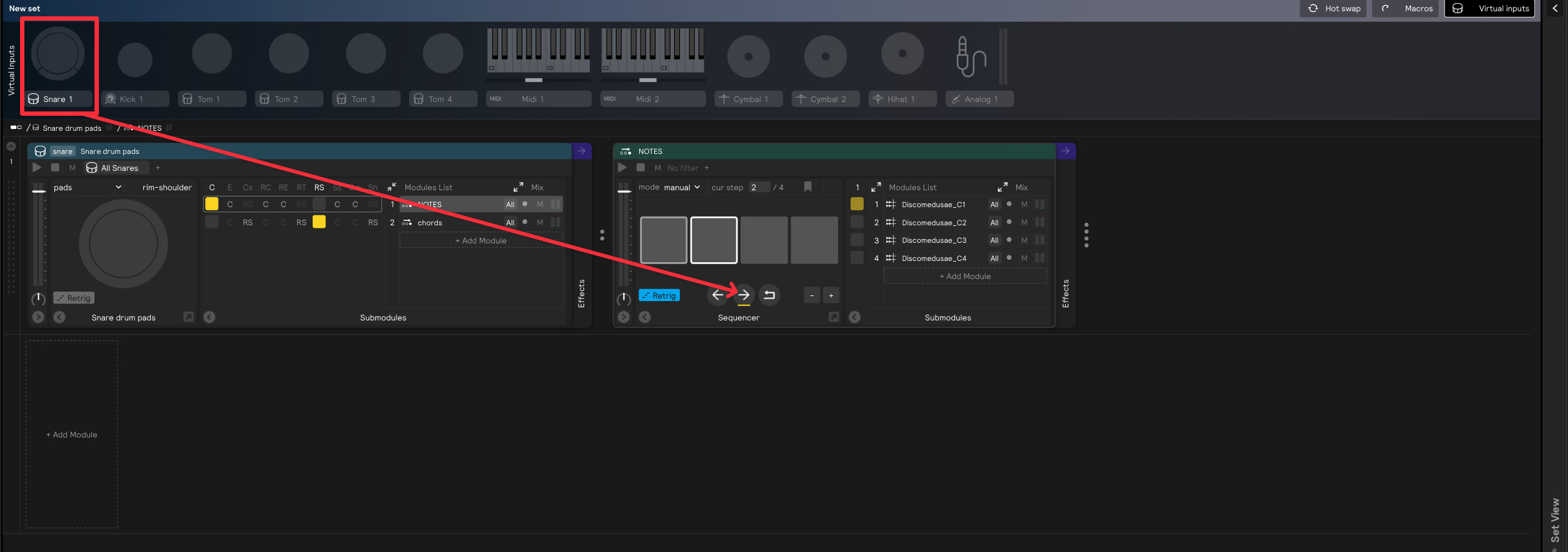
Or you can drag and drop the snare virtual input onto the next button and select rim tip + rim shoulder.
1 Like
That’s sorted it, thank you. So how come in the tutorial video the input of the assignment is set to default and it doesn’t change (on camera anyhow). Would that also have been changed and overlooked in the edit?
1 Like
No problem @bid! It’s possible that happened, we’ll look into it. Thanks for bringing it up!
1 Like
Ok, so now I’m struggling with the nested sequence from that same tutorial. The stickshot assignment isn’t doing anyhting. I’ve tried to change the default of the assigment to the parent (as we did for the first sequencer) but it doesn’t give me any options - they’re greyed out.
My mistake, hadn’t trained the zone for stick shot! (incase people are following the thread!).
The Nested Sequencer.sp2 (64.1 KB)
1 Like