Question 1:
What’s the quickest way to completely turn off velocity for a single sample? I need kick, snare, and hi-hat to play at a fixed volume with no dynamics (like a drum machine or turning velocity off on an SPD-SX).
Question 2:
What’s the best way to add ghost notes underneath a snare sample? Should I map velocity to control the playback volume of a single sample, or is there a better method?
Thanks for such and amazing instrument!
2 Likes
Hi @Keaganobrien!
For your first question, I think you want to use the velocity I/O panel.
To open the velocity I/O panel on any module, click the icon on the top right of the module and check “velocity I/O panel” from the drop down list.
You’ll want to drag it all the way to the top like in the screenshot above. I recommend dragging the bottom tag a bit to the right to add some thresholding, as well, so that ghost notes or bumping the drum doesn’t cause a full loudness playback of the sample.
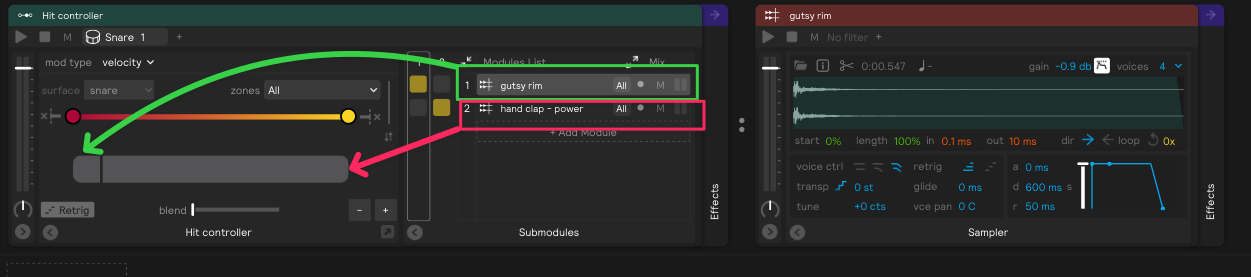
For question 2, unless I am misunderstanding, I think the best way to accomplish this would be with a hit controller.
You would put your ghost note sound as step one (and drag the step size down quite small), and then you could put your non-ghost note sound as step two and make that step quite large.
2 Likes