I’m enjoying the software and I have no complaints about the trigger but the interface is redundant. It also seems to be vulnerable to signal interference and makes unwanted noise. I can’t justify keeping this unit unfortunately. Make the software available separately please. My existing interface would work just as well (likely better) paired with these triggers. The “portal” is a disappointment. I applaud the software but I can’t justify paying the bundle price when I’ll never use the interface. I think this is a major marketing weakness for an otherwise cool product. I’ll be returning everything with a heavy heart. It could easily be different 
1 Like
Pretty sure you can’t use the sensors with any other interface. The inputs on the Evans portal supply power to the sensors, and it isn’t the standard 48v phantom power. I think you’d risk ruining the sensors if you did that.
Also, I don’t get any interference with my portal. Not sure what you mean there. Have you tried reaching out to sunhouse support? They can probably help you with whatever issues you’re experiencing. I would suggest trying that before just giving up on it. It seems to be working great for a lot of us.
2 Likes
I don’t get any unwanted noise either and i don’t understand how this could work without the portal inputs but you can set the output of the software to your own interface and hear the sound through there.
I’ve really enjoyed the Sensory Percussion interface. I use all 8 channels of ADAT to output drums and vocal mics, three aux outs for click, guide, and backtracks, and the line in for headphone input from my mixer. No noise interference or crackling/distorted audio.
Context:
I’m in a wedding band, and I wanted a digital drum solution for volume control. My band uses Ableton Live 12 for backing tracks, guide tracks, click, lighting control, and MIDI control. My band has an audio rack. The rack contains a QSC Touchmix 16 (for wireless mixing controls) and a Behringer ADA8200 ADAT Interface (for ADAT audio from the Sensory Percussion Interface).
My Setup:
Computer - Macbook Pro m5 24gb 1tb
Software - Sunhouse Sensory Percussion, Soundswitch DMX lighting, Ableton Live 12, Virtual DJ
Channels - Adat 1: Kick, Adat 2: Snare, Adat 3: Rack and Floor Tom, Adat 4: Hi-Hat, Adat 5: Crash, Adat 6: Ride, Adat 7: Vocal Mic, Adat 8: Music Director Mic, Aux 5: Click, Aux 6: Guide, Aux 7: Backing Tracks, Line In: In-ear signal from audio rack.
Issues:
Any issues I’ve had in the past with the interface were due to a lower-performing computer or a low-quality USB-C cable. As a Windows PC guy, if you’re into creative or performing work, it’s dumb not to get a MacBook.
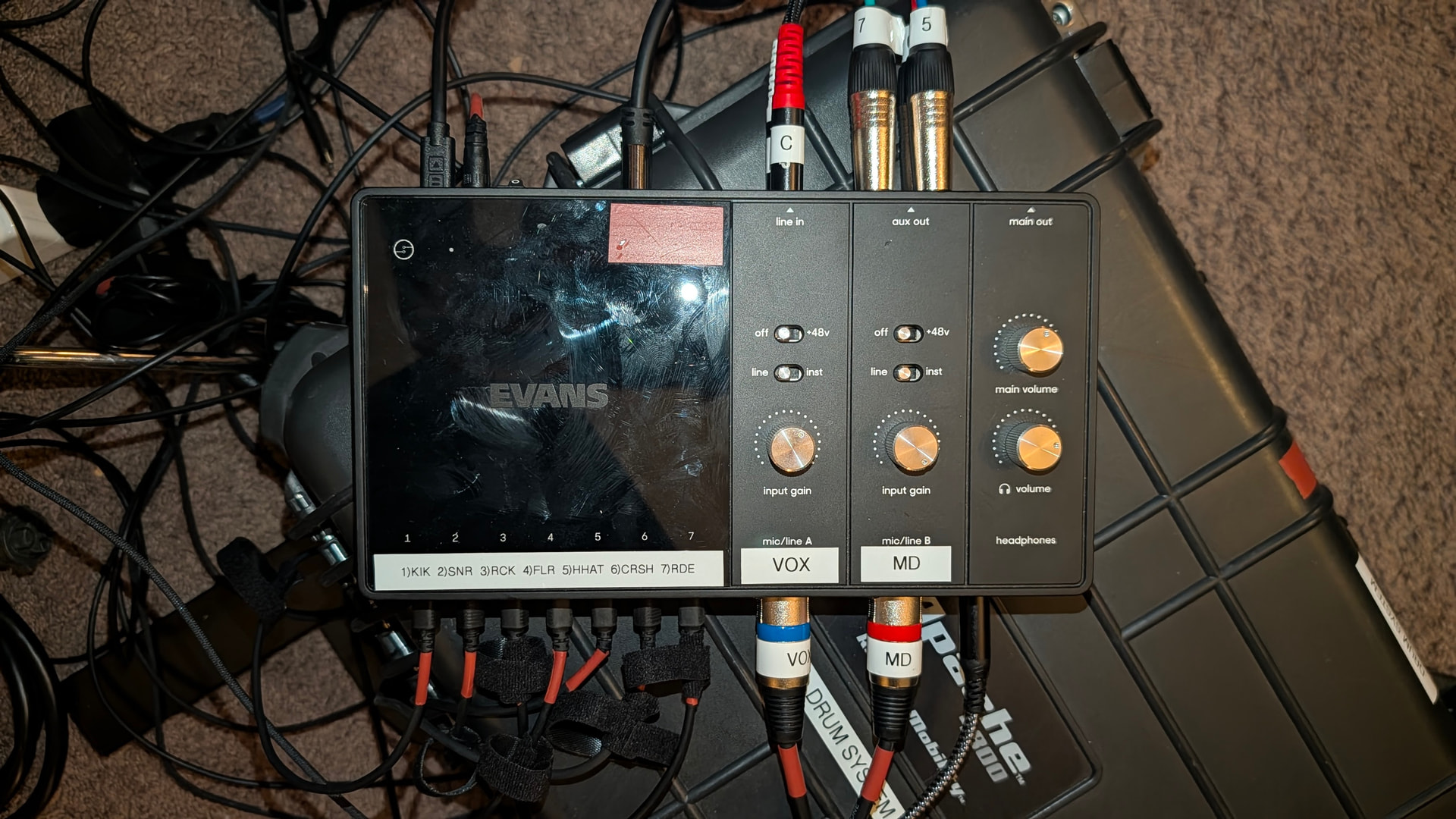
1 Like
Thanks for the reply  It’d be great to hear from a technical rep here because I’m 99% certain it is just straight up phantom power. If you have a reference that indicates otherwise please post a link here. I’m prepared to return the unit after the weekend so I’m info gathering in the meantime. The noise I’m getting is a subtle but distinct high pitched whine that changes quality depending on my proximity to the portal. That’s a second issue a tech rep could address. Anyone from in house reading these posts?
It’s a lower voltage than phantom power. You can’t use phantom power with the sensors. It’s been covered in other posts if you search the forum. You can also create an aggregate device on your computer to combine two interfaces - use the portal just for the sensors and a separate audio interface for recording mics, etc. That’s how I have it set up.
Yes, as others mentioned the sensors use a lower voltage than Phantom Power. @slackerheadtube, feel free to send a diagnostic report to support@sunhou.se
Be sure that it captures the issues you are running into. Feel free to send multiple reports if necessary. We’ll check them out and get back to you on Monday.
Oh! Very helpful. Will do. Thanks 
+1 to Steven’s message and we’ll await your diagnostic to see what we see - but, environmental noise that is making out to your speakers might not be captured by a diagnostic. You’ll want to make sure you’re using balanded output cables. All of the analog outs (except the headphones of course) are balanced, so make sure you’re using TRS cables to connect the outs to your speakers. That can make a big difference. Some interfaces enforce balanced connection with XLR jacks, but we went with TRS for space considerations.
If you’re hearing signal interference it’s likely coming from somewhere else and you’re not likely to get better results with another comparable interface like a focusrite (sensor compatability aside).
1 Like
I’ve learned that I can’t have the portal and my other interface plugged in to the computer simultaneously. This was the source of the noise. Is there some kind of routing fix I could try?
Hi! I use a MIDAS MR18 and the Portal simultaneously and there’s no noise. Did you try using a USB hub?