Troubleshooting Cymbal & Hi-hat issues

Hey all, a few of you have sent us messages about misfires or issues with the cymbal and hi-hat sensors. We wanted to share some tips as well as a way you can help us.

Check that your gear is setup right

If you’re seeing mis-fires on cymbal or hi-hats or you’re seeing strange pedal open/close behavior, the first thing to make sure of is that you have the sensor’s elements aligned properly. The rubber flex washer on both the hi-hat and cymbal have an important orientation, with a fitted shape that seats on to the sensor module in only one way. There’s a little line on the sensor module that should line up with the line on the rubber part.

You also want to make sure the power indicator light on the sensor module is facing you.

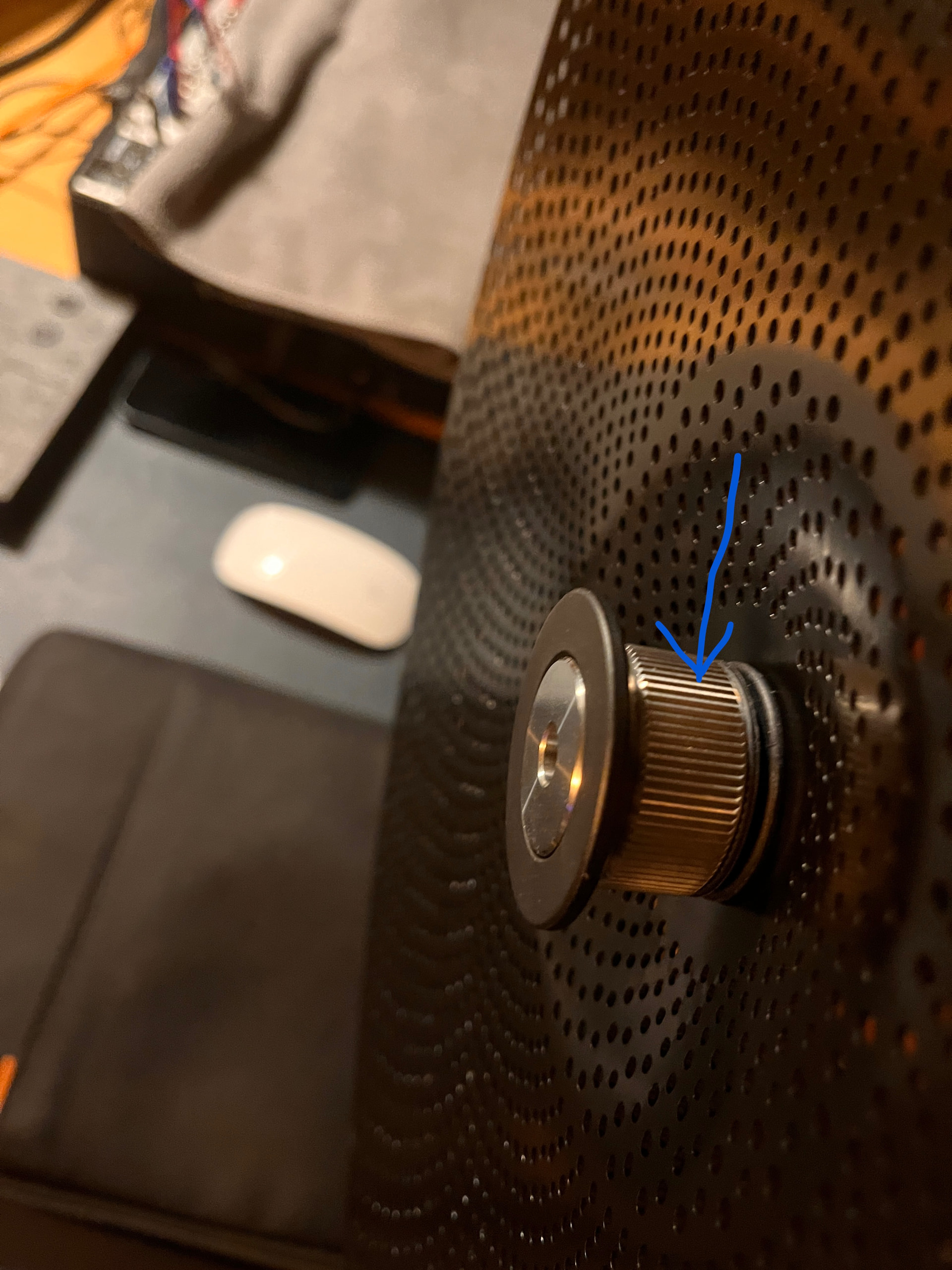
If you’re finding that you’re mostly having issues with quiet hits on the hi-hat, then tightening the bottom thumbscrew on the clutch can help things.

If you haven’t watched it already, take a look at the Setup Video. It walks through setting up the cymbal and hi-hat sensors and all these details.

Send us audio from your sensor

If you’re still seeing issues, then the best way for us to help is if you can make an audio recording of the sensor’s actual signal, playing the cymbal in a way so as to demonstrate the issue for us, and send it to support@sunhou.se.

You can do this in any DAW by selecting the sensors input channel (sensor input 1 is channel 5) and recording the audio for a bit. You can also make a quick recording in the app by using the diagnostic report tool (from the help menu), which will record for 10 seconds at a time across all the sensor inputs.

On a broader note - this is the first wide usage of the cymbal sensors so it’s possible we run into edge cases we didn’t see during beta tests. We’re committed to making the cymbals as good as they can be, and your help in identifying these issues and helping us improve the model benefits the entire SP community.

Any questions - we’re here for you - but to get the fastest response, send an email to support@sunhou.se

Thanks!

– The Sunhouse team
4 Likes

Thanks, that’s all really helpful. I’ll absolutely explore everything that you’ve suggested. For now, can I double check what you mean by the bottom thumbscrew on the hi hat clutch… Is it the part that I’ve highlighted in the image? If so then mine doesn’t appear to want to turn at all to either tighten or loosen it, it feels pretty fixed in place. Thanks.

1 Like

@lupo that’s exactly right. You can see how that piece can tighten at this part in the setup video. https://youtu.be/mzqi6jKRWKQ?si=LcosDldMRxO6R3gP&t=141

If it’s super tight, you can take off the quick lock and loosen it. But if you tighten it too much off the cymbal, it won’t fit when you try to put it back on. Let me know if that works for you.

1 Like

@tenoch when I tighten my bottom nut, it will eventually just pop off the bottom of the assembly. Should that be happening, or should I be able to completely tighten it? What I’ve been doing is tightening it until it pops off the assembly, then backing the nut off about 1/8th to 1/4 turn, then reattaching. This gets it as tight as possible for me

1 Like

Yeah, I think you might be over tightening it. Maybe start from loose, attach it, then go to “finger tight”. You shouldn’t need to crank down on it.

1 Like

My ride and my crash are working so amazing. I just have got to figure out the hi hats. I am going to watch that video and make sure everything is matching. Thank you for this announcement post!

I was having hi hat issues until I realized about the alignment issue mentioned above. I didn’t see the lines and the set up doesn’t really mention them, but when I noticed the bump and hole on my hi hat I realized I didn’t have things lined up right.

For me it doesn’t matter if I tighten it or not, I get the same open sounds when playing a foot chick. The pedal tension indicator just jumps back to open even if I keep the pedal pressed down. I think that’s not how it should work, it should stay in the closed position until I lift my foot off the pedal, it should sound open (or closed) only when I hit the hihat with the sticks.

Is this the normal behaviour for the hihat pedal tension indicator @tenoch ? I get the same. My understanding is that to sense pedal tension it requires the hihat cymbal to be hit with a drumstick or to receive a foot pedal “chick” to register how open or closed it is. When there are no hits, the indicator returns to an open position like @edxter says. Would be great to clarify if this is the expected behaviour.

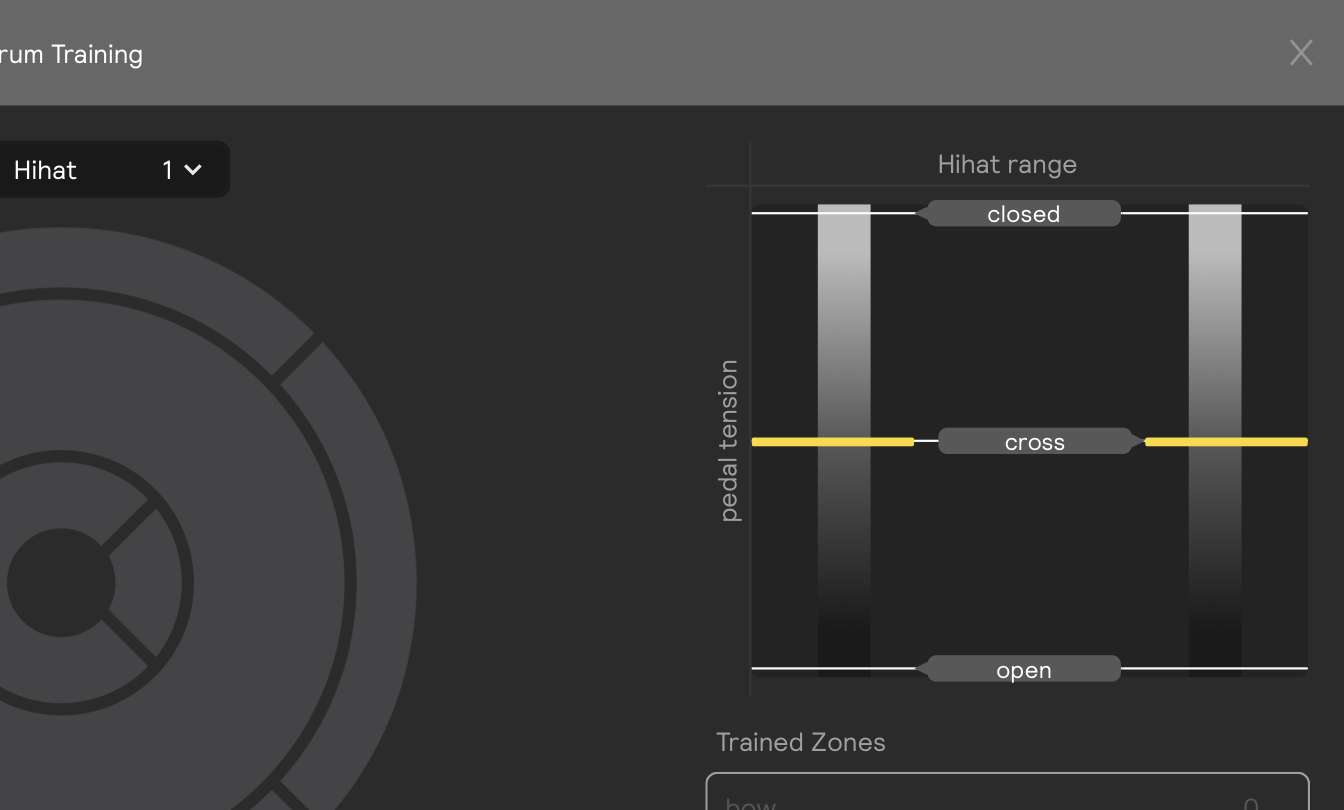
I hadn’t seen the ‘hihat range’ section in the hihat training page, you could just add a “hihat calibration” function (like most drum modules have) to calibrate the open/closed action according to each personal stand, tension etc.

2 Likes

I’m also seeing the open sounds when playin a chick happens more with some hihats than others, for instance with the ‘Zildjian KZ Custom Hi-Hat 14’ in the first set of the cymbal expansion is more predominant, whereas with ‘Zildjian EAK Mod Hi-Hat_13 inch’ in the second set it happens much more less. So it could be the samples as well.

Interesting. I’ve briefly listened to all of them, but I haven’t played around too much with the sp2 hi hats. They aren’t my sound personally since they’re all recorded with only close up microphones.

However I also recently found that Hi hat range setting. Seems kinda backwards to have closed at the top and open at the bottom. But anyway, I lowered the closed bar and raised the open bar as far as they would go, and I’m now getting much more consistent open/close in sd3. The partially open articulations aren’t great, but that’s acceptable to me for now. If it never gets any better, I’m super happy with how good it is right now. …and I’m sure it will get better. The one thing I can’t wait for is support for other cymbals. I can’t hardly stand the Evans 14” hats. I didn’t like the zildjian l80 14’s either. I bought an extra 16” l80 and now I use two 16” for hats. When this setup works with sp2, and especially over midi, I will be ecstatic!

3 Likes

Can you go into detail about why you prefer the 16in l80 over the other options? What do you find so intolerable about the evans?

Also, I find the hi hats much too “up front”. How do you turn down a single kit piece?

I just prefer the way the 16s sound. Low-volume cymbals tend to be pretty high-pitched and tinny in general. The L80s are known for being some of the quietest and least tinny options out there, and I watched a lot of comparison videos before buying them.

The 14” hi-hats in particular sounded pretty harsh to me. That’s what gave me the idea to try another 16” instead, and I ended up liking it much better. The Evans 14” hats also have an extra high-pitched “ping” that really bothers my ears.

You can try the sensors with the Zildjians since you already have them and report back

Yes I did. The hi hat sensor doesn’t work well with the 14” l80 hats. For the two cymbal sensors, I haven’t even tried the Evans cymbals yet because they work amazingly well with the zildjians

I’m using them with 18” and 20” L80s btw

I have also been having some issues with the hats: the pedal triggering the edge zone, and also a single pedal action would trigger two pedal sounds in very short succession as the edges of the hi-hats would not close 100% symmetrically.

Tightening the nut helped, but I also tried a physical solution and taped a piece of felt to the far edge of the bottom hat so that when I press the pedal, only one side can register the hit. This helped a lot, and it also reduced the number of erroneous edge hits the pedal action was creating.

I do find the levels for the cymbals are off, and reducing the volume of the hats in the presets also helped the kits sound more natural.

1 Like

So here I am replying to my own post again, but there are a couple of settings that really helped get the hi-hats working properly, so I’m sharing them here.

  1. I know the cymbals are advertised to work straight out of the box, but I had to “train” them to my playing style. This really made a big difference. Here’s how I did it:
  • leave the hi-hat in the full open position
  • Open the edit screen for the hats
  • make sure the dotted red threshold line is set at zero.
  • in the open position, hit the hats as hard as you think would be your normal maximum velocity
  • drag down the “input velocity” slider until your maximum hits are no longer maxing out at the top of the box. (this was my issue, and it was affecting the sound big time)
  • then on the output gain section, adjust the slider so that the final output also is near the top, but does not max out.
  • Leave the “hihat range” settings at full open and full closed, gradually adjust these to see if you prefer different settings (my eventual conclusions was that leaving fully open worked best for me).
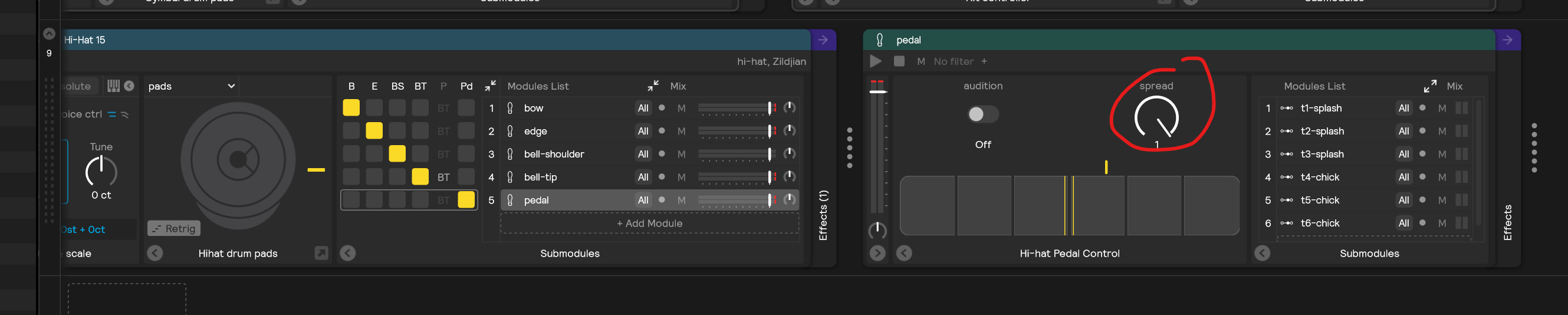
  1. I don’t know exactly what the “spread” setting does, but the default is 75%. I bumped this to 100 and found that this helped the hats sound more realistic. You need to do this for each zone.

  1. I realized that the flex holder for the cable doesn’t do a great job of keeping the cable loose; it gradually tightened over time and started to pull on the jack. I’m pretty sure this was creating some false hits when I closed the pedal and it pulled on the jack. I used an elastic to make sure this stopped happening.

Cheers everyone!

3 Likes

Wow. Thanks so much for putting in the time to write this. I honestly have only played a few sessions with the cymbals so far because the hi hats have been pretty rough.

It’s crazy that for a product like this there is no manual, tutorial or any explanation of what these settings do and how you might optimize it for your set up. I appreciate your work.

1 Like